Heatmiser neoHub G3 Smart Heating Gateway – Third Generation Neo System Hub with HomeKit, Alexa & Google Home
Heatmiser neoHub G3 Smart Heating Gateway – Third Generation Neo System Hub with HomeKit, Alexa & Google Home
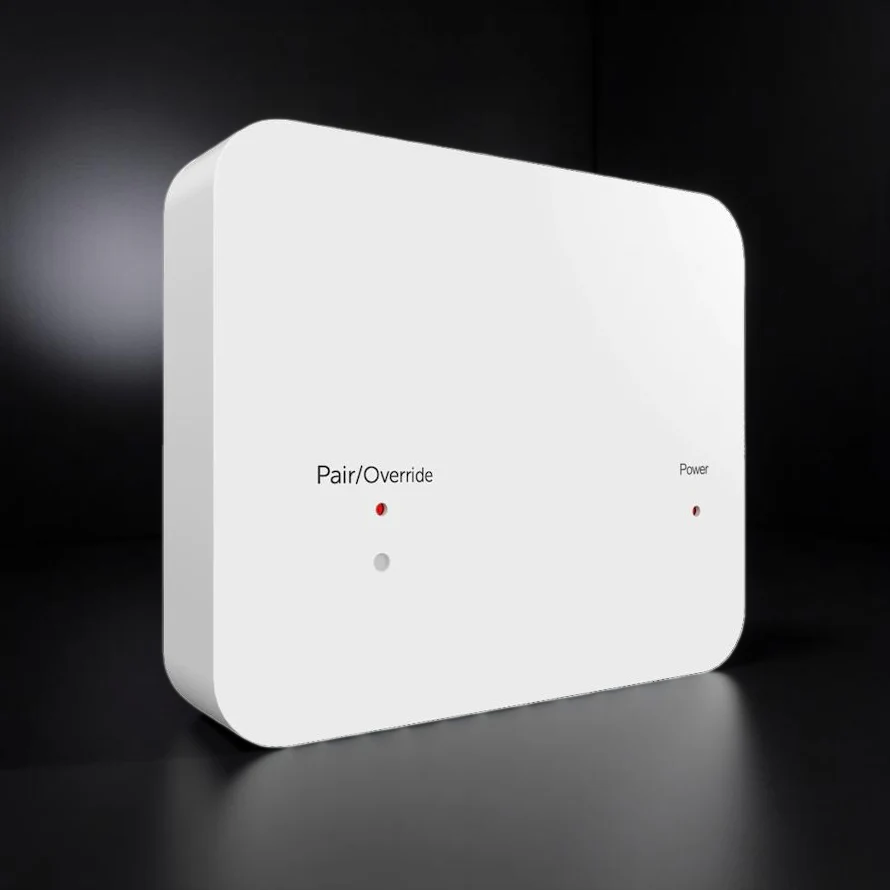
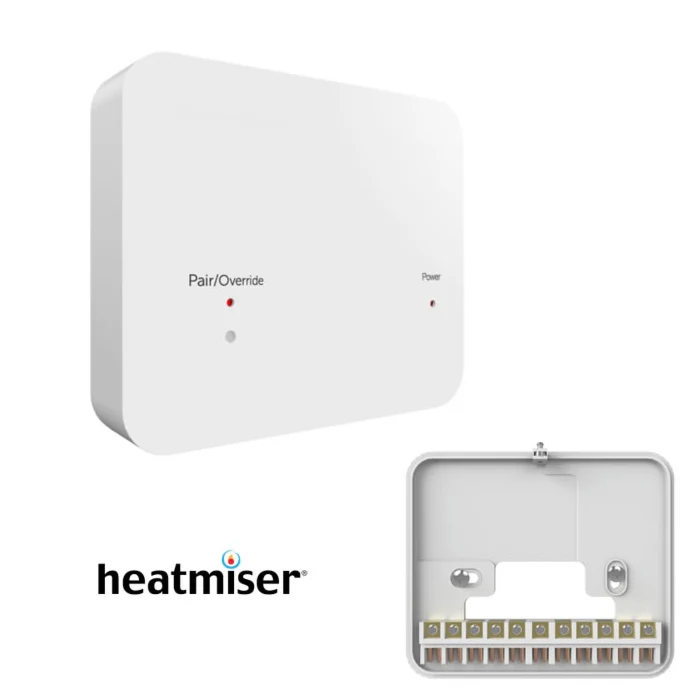
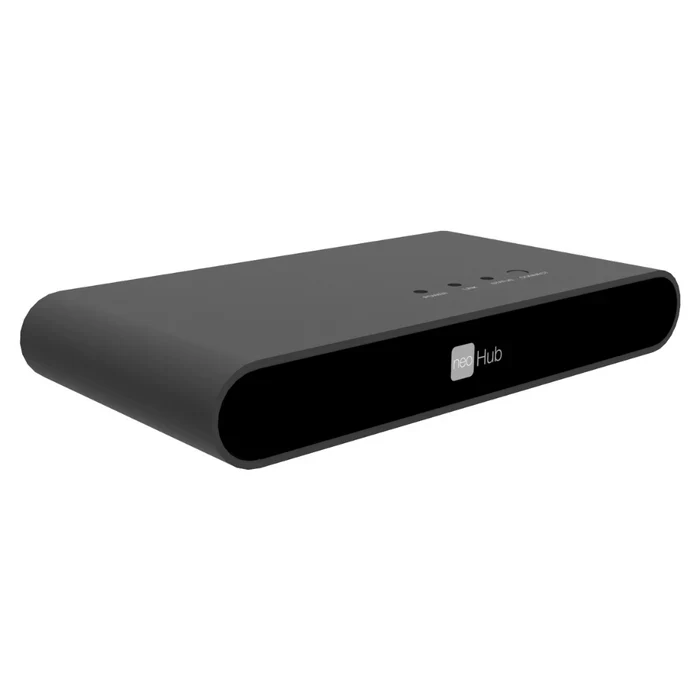
The IMI Heatmiser neoHub G3 is the third-generation smart heating gateway at the heart of the Heatmiser neo heating control system. It connects your neoStat thermostats, neoFlo radiator valve heads, neoPlug smart sockets, and wireless sensors into a single, unified platform — controlled from anywhere via the free neoApp on iOS or Android. A single neoHub G3 supports up to 32 neo devices, making it equally suitable for a one-zone flat upgrade or a multi-room whole-home smart heating installation.
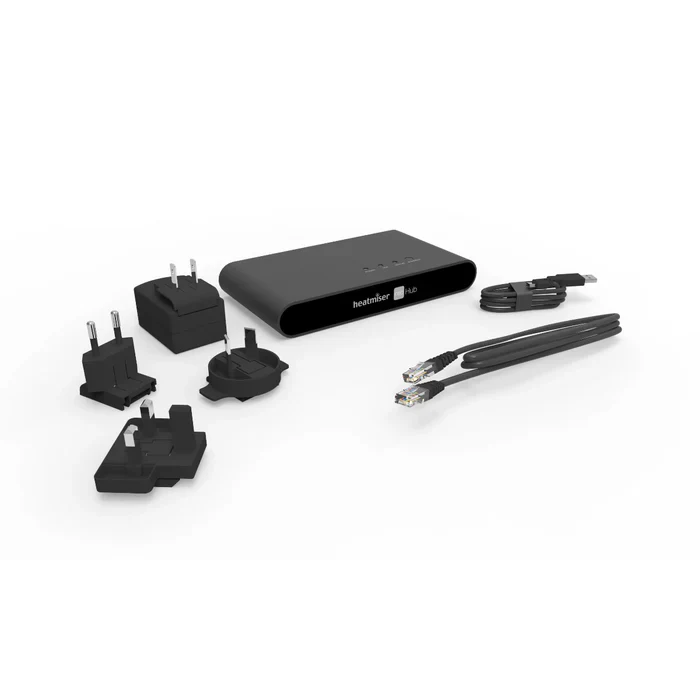
Connection is via a wired Ethernet port (RJ45, cable supplied) to your broadband router — giving rock-solid reliability without dependence on Wi-Fi congestion. The G3 introduces a built-in NFC chip for faster device pairing, an extended 4-week system history with per-zone energy monitoring, and full compatibility with the new neoFlo smart radiator valve head for UFH/radiator hybrid systems. Communication between the hub and all neo devices is encrypted using AES-128 with randomly generated keys. Smart home integration covers Apple HomeKit, Amazon Alexa, Google Home, and IFTTT — no subscription required.
Technical Specifications
| Parameter | Value |
|---|---|
| MPN / Product code | WU101122G3 |
| Generation | 3rd Generation (G3) |
| Max connected devices | 32 neo devices |
| Network connection | 1× Ethernet (RJ45) — cable supplied; connects to broadband router |
| Wi-Fi (app setup) | 2.4 GHz — used for mobile device initial setup only; hub itself uses Ethernet |
| RF communication (to devices) | 868 MHz mesh network (max e.r.p. 6.24 dBm) |
| Encryption | AES-128 with randomly generated keys (hub ↔ devices); HomeKit encryption (hub ↔ Apple) |
| Pairing method | NFC chip (built-in) + neoApp — tap to pair compatible devices |
| Power supply | 9V DC via mini USB (adaptor supplied); also accepts 6–12V DC via 2.1mm jack |
| Mains supply | 230V AC (via included adaptors) |
| Dimensions (L × H × D) | 170 × 91 × 25.5 mm |
| Smart home platforms | Apple HomeKit, Amazon Alexa, Google Home, IFTTT |
| App | IMI Heatmiser neoApp — iOS and Android (free, no subscription) |
| History logging | 4-week per-zone history: set temperature, pre-heat periods, heating active, daily hours-run |
| Firmware updates | Automatic OTA — hub and all connected devices updated in background |
| Clock / time sync | Automatic — UK BST/GMT, CET, and New Zealand time zones supported |
| Geo-location | Yes — per-user leave/return radius; heating activates automatically on approach |
| Subscription fee | None — full functionality included, no monthly charges |
| Regulatory compliance | CE / RED Directive 2014/53/EU — Declaration of Conformity at heatmiser.com |
| Manufacturer | IMI Heatmiser |
Compatible Neo Devices
| Device | Type | Notes |
|---|---|---|
| neoStat Pro | Wired smart thermostat | Acts as mesh repeater on the network |
| neoStat Touch | Touchscreen smart thermostat | Acts as mesh repeater on the network |
| neoStat-HW | Hot water thermostat | Hot water scheduling and control |
| neoStat 12V | 12V wired thermostat | Retrofit to existing Heatmiser 12V wiring centres |
| neoStat-HC | Fan coil thermostat | For fan coil unit control |
| neoAir v2 / v2-M / v3 | Battery wireless thermostat | Works with RF Switch or UH8-RF wiring centre |
| neoFlo | Smart radiator valve head (TRV) | Requires neoHub G3 — not compatible with Gen 1 or Gen 2 |
| neoPlug | App-controllable smart socket | Acts as mesh repeater on the network |
| Wireless air sensor / contact sensor | Remote sensors | Temperature and open/close detection |
Key Features
Wired Ethernet — rock-solid reliability
Unlike smart heating hubs that run over Wi-Fi and compete with smartphones, tablets, and streaming devices for bandwidth, the neoHub G3 connects via a dedicated Ethernet port on your router. This eliminates range issues, packet loss, and the interference that plagues 2.4 GHz-only devices — giving consistent, low-latency control regardless of how busy your home network is.
868 MHz mesh network — whole-home coverage
The neoHub G3 communicates with thermostats and devices at 868 MHz — a frequency that penetrates walls and floors far more effectively than 2.4 GHz. Every mains-powered neo device (neoStat, neoPlug) acts as a mesh repeater, relaying signals onward to devices further away. This self-healing mesh architecture means range extends naturally as you add more devices.
NFC pairing — faster device setup
The G3 is the first neoHub generation to include a built-in NFC chip. When adding thermostats or accessories during setup, compatible devices can be paired by holding them near the hub rather than navigating through multiple menu screens. This significantly speeds up multi-device installations, particularly useful for heating engineers commissioning larger systems.
AES-128 encryption — secure by design
All communication between the neoHub G3 and connected neo devices is secured with AES-128 encryption using randomly generated session keys — not fixed credentials. HomeKit connections use Apple's own security layer on top of this. The hub is PSTI compliant and Heatmiser publishes a Statement of Compliance covering the security update support period.
4-week energy history per zone
A key G3 improvement over earlier generations is the expanded history log — 4 weeks of per-zone data accessible in the neoApp. You can review set temperature, pre-heat periods, when heating was active, and daily hours-run for each zone, navigating by calendar or day-by-day. This makes it straightforward to identify wasted heating, verify schedule performance, and demonstrate energy savings.
Smart profiles — manage many zones efficiently
Rather than programming each zone individually, the neoApp lets you create a named heating profile (e.g., "Bedroom schedule" or "Daytime setback") and apply it to multiple zones simultaneously. Changing the profile updates every linked zone at once — invaluable for multi-zone systems with similar schedules, or for property managers running multiple units on a single hub.
Geo-location — heating follows the household
Each user on the system can configure their own leave and return radius in the neoApp. When the last person crosses the leave boundary, heating drops to setback; as the first person approaches the return radius, heating restarts — so the home is warm on arrival. Multiple users are supported, each with their own geo-location settings and access level (guest or admin).
Automatic OTA updates — always current
The neoHub G3 checks for firmware updates automatically and installs them in the background — for the hub itself and for every connected neo device. There is no manual update process and no risk of a device being left on outdated firmware. The first install may prompt a required update; thereafter, all updates are fully automatic and unattended.
neoFlo compatibility — UFH and radiator hybrid
The G3 is the only neoHub generation compatible with the neoFlo smart radiator valve head. Combined with the IMI Heatmiser RF Switch, it enables true room-by-room boiler demand from individual radiators — integrating radiator zones and underfloor heating zones into a single neoApp interface. This makes the G3 the essential hub for any new installation involving neoFlo.
Setup Overview
Connect the hub to a spare Ethernet port on your broadband router using the supplied cable. Plug in the power adaptor.
Download the neoApp (iOS or Android) and create your free account. Connect your phone to the same Wi-Fi network as the router.
Add a location — tap the hub's connect button. The Link light turns red when connected to your network, then green when the Heatmiser cloud link is confirmed.
Pair your neo devices — use NFC tap or the in-app pairing flow for each thermostat, sensor, or neoFlo. Name each zone and assign a profile.
Optional: pair to HomeKit — go to Settings → HomeKit & Siri in the neoApp, create or select a Home, and scan the HomeKit code on the back of the hub with your iPhone camera.
Frequently Asked Questions
Is there a monthly subscription fee for the neoApp or cloud service?
No. The neoApp and all cloud features — including remote access, geo-location, voice assistant integration, and history logging — are included at no extra cost. There is no subscription and no recurring charge.
What happens to my heating if the internet goes down?
Your heating continues to run on its local programme. The thermostats operate normally and can still be adjusted manually at the wall. Remote app access will be unavailable until your internet connection is restored, but comfort is unaffected.
Can I upgrade from a neoHub Gen 1 or Gen 2 to the G3?
Yes. The neoHub G3 is compatible with the same range of neoStat, neoAir, and neoPlug devices as previous generations. Your existing thermostats can be re-paired to the new hub. The G3 is required if you wish to add neoFlo radiator valve heads to your system, as neoFlo is not compatible with earlier hub generations.
Can multiple people control the heating from the app?
Yes. The system owner can share access with other users, who can be assigned either Guest or Admin roles. Guest users can adjust temperatures and view zones but cannot change system settings or share access further. Only the owner can invite additional users. Each user can also configure their own geo-location leave and return settings.
Do I need the RF Switch to use neoFlo radiator heads with the neoHub G3?
The RF Switch is required only if you want the neoFlo to call for heat from the boiler independently, room by room. Without the RF Switch, the neoFlo still pairs with the neoHub G3 and provides full app control, scheduling, and remote access — but the boiler is still controlled by an existing central thermostat. The RF Switch enables true per-room boiler demand and is installed by a heating engineer.
IMI Heatmiser neoFlo Smart Radiator Valve Head | IMI Heatmiser RF Switch | Heatmiser neoStat Pro Smart Thermostat | Heatmiser neoStat Touch | Heatmiser neoAir V3 Wireless Thermostat | Heatmiser neoPlug Smart Socket | 3× neoFlo + neoHub G3 Starter Pack | 4× neoFlo + neoHub G3 Smart Pack
Original: $201.10
-65%$201.10
$70.38More Images

Heatmiser neoHub G3 Smart Heating Gateway – Third Generation Neo System Hub with HomeKit, Alexa & Google Home
The IMI Heatmiser neoHub G3 is the third-generation smart heating gateway at the heart of the Heatmiser neo heating control system. It connects your neoStat thermostats, neoFlo radiator valve heads, neoPlug smart sockets, and wireless sensors into a single, unified platform — controlled from anywhere via the free neoApp on iOS or Android. A single neoHub G3 supports up to 32 neo devices, making it equally suitable for a one-zone flat upgrade or a multi-room whole-home smart heating installation.
Connection is via a wired Ethernet port (RJ45, cable supplied) to your broadband router — giving rock-solid reliability without dependence on Wi-Fi congestion. The G3 introduces a built-in NFC chip for faster device pairing, an extended 4-week system history with per-zone energy monitoring, and full compatibility with the new neoFlo smart radiator valve head for UFH/radiator hybrid systems. Communication between the hub and all neo devices is encrypted using AES-128 with randomly generated keys. Smart home integration covers Apple HomeKit, Amazon Alexa, Google Home, and IFTTT — no subscription required.
Technical Specifications
| Parameter | Value |
|---|---|
| MPN / Product code | WU101122G3 |
| Generation | 3rd Generation (G3) |
| Max connected devices | 32 neo devices |
| Network connection | 1× Ethernet (RJ45) — cable supplied; connects to broadband router |
| Wi-Fi (app setup) | 2.4 GHz — used for mobile device initial setup only; hub itself uses Ethernet |
| RF communication (to devices) | 868 MHz mesh network (max e.r.p. 6.24 dBm) |
| Encryption | AES-128 with randomly generated keys (hub ↔ devices); HomeKit encryption (hub ↔ Apple) |
| Pairing method | NFC chip (built-in) + neoApp — tap to pair compatible devices |
| Power supply | 9V DC via mini USB (adaptor supplied); also accepts 6–12V DC via 2.1mm jack |
| Mains supply | 230V AC (via included adaptors) |
| Dimensions (L × H × D) | 170 × 91 × 25.5 mm |
| Smart home platforms | Apple HomeKit, Amazon Alexa, Google Home, IFTTT |
| App | IMI Heatmiser neoApp — iOS and Android (free, no subscription) |
| History logging | 4-week per-zone history: set temperature, pre-heat periods, heating active, daily hours-run |
| Firmware updates | Automatic OTA — hub and all connected devices updated in background |
| Clock / time sync | Automatic — UK BST/GMT, CET, and New Zealand time zones supported |
| Geo-location | Yes — per-user leave/return radius; heating activates automatically on approach |
| Subscription fee | None — full functionality included, no monthly charges |
| Regulatory compliance | CE / RED Directive 2014/53/EU — Declaration of Conformity at heatmiser.com |
| Manufacturer | IMI Heatmiser |
Compatible Neo Devices
| Device | Type | Notes |
|---|---|---|
| neoStat Pro | Wired smart thermostat | Acts as mesh repeater on the network |
| neoStat Touch | Touchscreen smart thermostat | Acts as mesh repeater on the network |
| neoStat-HW | Hot water thermostat | Hot water scheduling and control |
| neoStat 12V | 12V wired thermostat | Retrofit to existing Heatmiser 12V wiring centres |
| neoStat-HC | Fan coil thermostat | For fan coil unit control |
| neoAir v2 / v2-M / v3 | Battery wireless thermostat | Works with RF Switch or UH8-RF wiring centre |
| neoFlo | Smart radiator valve head (TRV) | Requires neoHub G3 — not compatible with Gen 1 or Gen 2 |
| neoPlug | App-controllable smart socket | Acts as mesh repeater on the network |
| Wireless air sensor / contact sensor | Remote sensors | Temperature and open/close detection |
Key Features
Wired Ethernet — rock-solid reliability
Unlike smart heating hubs that run over Wi-Fi and compete with smartphones, tablets, and streaming devices for bandwidth, the neoHub G3 connects via a dedicated Ethernet port on your router. This eliminates range issues, packet loss, and the interference that plagues 2.4 GHz-only devices — giving consistent, low-latency control regardless of how busy your home network is.
868 MHz mesh network — whole-home coverage
The neoHub G3 communicates with thermostats and devices at 868 MHz — a frequency that penetrates walls and floors far more effectively than 2.4 GHz. Every mains-powered neo device (neoStat, neoPlug) acts as a mesh repeater, relaying signals onward to devices further away. This self-healing mesh architecture means range extends naturally as you add more devices.
NFC pairing — faster device setup
The G3 is the first neoHub generation to include a built-in NFC chip. When adding thermostats or accessories during setup, compatible devices can be paired by holding them near the hub rather than navigating through multiple menu screens. This significantly speeds up multi-device installations, particularly useful for heating engineers commissioning larger systems.
AES-128 encryption — secure by design
All communication between the neoHub G3 and connected neo devices is secured with AES-128 encryption using randomly generated session keys — not fixed credentials. HomeKit connections use Apple's own security layer on top of this. The hub is PSTI compliant and Heatmiser publishes a Statement of Compliance covering the security update support period.
4-week energy history per zone
A key G3 improvement over earlier generations is the expanded history log — 4 weeks of per-zone data accessible in the neoApp. You can review set temperature, pre-heat periods, when heating was active, and daily hours-run for each zone, navigating by calendar or day-by-day. This makes it straightforward to identify wasted heating, verify schedule performance, and demonstrate energy savings.
Smart profiles — manage many zones efficiently
Rather than programming each zone individually, the neoApp lets you create a named heating profile (e.g., "Bedroom schedule" or "Daytime setback") and apply it to multiple zones simultaneously. Changing the profile updates every linked zone at once — invaluable for multi-zone systems with similar schedules, or for property managers running multiple units on a single hub.
Geo-location — heating follows the household
Each user on the system can configure their own leave and return radius in the neoApp. When the last person crosses the leave boundary, heating drops to setback; as the first person approaches the return radius, heating restarts — so the home is warm on arrival. Multiple users are supported, each with their own geo-location settings and access level (guest or admin).
Automatic OTA updates — always current
The neoHub G3 checks for firmware updates automatically and installs them in the background — for the hub itself and for every connected neo device. There is no manual update process and no risk of a device being left on outdated firmware. The first install may prompt a required update; thereafter, all updates are fully automatic and unattended.
neoFlo compatibility — UFH and radiator hybrid
The G3 is the only neoHub generation compatible with the neoFlo smart radiator valve head. Combined with the IMI Heatmiser RF Switch, it enables true room-by-room boiler demand from individual radiators — integrating radiator zones and underfloor heating zones into a single neoApp interface. This makes the G3 the essential hub for any new installation involving neoFlo.
Setup Overview
Connect the hub to a spare Ethernet port on your broadband router using the supplied cable. Plug in the power adaptor.
Download the neoApp (iOS or Android) and create your free account. Connect your phone to the same Wi-Fi network as the router.
Add a location — tap the hub's connect button. The Link light turns red when connected to your network, then green when the Heatmiser cloud link is confirmed.
Pair your neo devices — use NFC tap or the in-app pairing flow for each thermostat, sensor, or neoFlo. Name each zone and assign a profile.
Optional: pair to HomeKit — go to Settings → HomeKit & Siri in the neoApp, create or select a Home, and scan the HomeKit code on the back of the hub with your iPhone camera.
Frequently Asked Questions
Is there a monthly subscription fee for the neoApp or cloud service?
No. The neoApp and all cloud features — including remote access, geo-location, voice assistant integration, and history logging — are included at no extra cost. There is no subscription and no recurring charge.
What happens to my heating if the internet goes down?
Your heating continues to run on its local programme. The thermostats operate normally and can still be adjusted manually at the wall. Remote app access will be unavailable until your internet connection is restored, but comfort is unaffected.
Can I upgrade from a neoHub Gen 1 or Gen 2 to the G3?
Yes. The neoHub G3 is compatible with the same range of neoStat, neoAir, and neoPlug devices as previous generations. Your existing thermostats can be re-paired to the new hub. The G3 is required if you wish to add neoFlo radiator valve heads to your system, as neoFlo is not compatible with earlier hub generations.
Can multiple people control the heating from the app?
Yes. The system owner can share access with other users, who can be assigned either Guest or Admin roles. Guest users can adjust temperatures and view zones but cannot change system settings or share access further. Only the owner can invite additional users. Each user can also configure their own geo-location leave and return settings.
Do I need the RF Switch to use neoFlo radiator heads with the neoHub G3?
The RF Switch is required only if you want the neoFlo to call for heat from the boiler independently, room by room. Without the RF Switch, the neoFlo still pairs with the neoHub G3 and provides full app control, scheduling, and remote access — but the boiler is still controlled by an existing central thermostat. The RF Switch enables true per-room boiler demand and is installed by a heating engineer.
IMI Heatmiser neoFlo Smart Radiator Valve Head | IMI Heatmiser RF Switch | Heatmiser neoStat Pro Smart Thermostat | Heatmiser neoStat Touch | Heatmiser neoAir V3 Wireless Thermostat | Heatmiser neoPlug Smart Socket | 3× neoFlo + neoHub G3 Starter Pack | 4× neoFlo + neoHub G3 Smart Pack
Product Information
Product Information
Shipping & Returns
Shipping & Returns
Description
The IMI Heatmiser neoHub G3 is the third-generation smart heating gateway at the heart of the Heatmiser neo heating control system. It connects your neoStat thermostats, neoFlo radiator valve heads, neoPlug smart sockets, and wireless sensors into a single, unified platform — controlled from anywhere via the free neoApp on iOS or Android. A single neoHub G3 supports up to 32 neo devices, making it equally suitable for a one-zone flat upgrade or a multi-room whole-home smart heating installation.
Connection is via a wired Ethernet port (RJ45, cable supplied) to your broadband router — giving rock-solid reliability without dependence on Wi-Fi congestion. The G3 introduces a built-in NFC chip for faster device pairing, an extended 4-week system history with per-zone energy monitoring, and full compatibility with the new neoFlo smart radiator valve head for UFH/radiator hybrid systems. Communication between the hub and all neo devices is encrypted using AES-128 with randomly generated keys. Smart home integration covers Apple HomeKit, Amazon Alexa, Google Home, and IFTTT — no subscription required.
Technical Specifications
| Parameter | Value |
|---|---|
| MPN / Product code | WU101122G3 |
| Generation | 3rd Generation (G3) |
| Max connected devices | 32 neo devices |
| Network connection | 1× Ethernet (RJ45) — cable supplied; connects to broadband router |
| Wi-Fi (app setup) | 2.4 GHz — used for mobile device initial setup only; hub itself uses Ethernet |
| RF communication (to devices) | 868 MHz mesh network (max e.r.p. 6.24 dBm) |
| Encryption | AES-128 with randomly generated keys (hub ↔ devices); HomeKit encryption (hub ↔ Apple) |
| Pairing method | NFC chip (built-in) + neoApp — tap to pair compatible devices |
| Power supply | 9V DC via mini USB (adaptor supplied); also accepts 6–12V DC via 2.1mm jack |
| Mains supply | 230V AC (via included adaptors) |
| Dimensions (L × H × D) | 170 × 91 × 25.5 mm |
| Smart home platforms | Apple HomeKit, Amazon Alexa, Google Home, IFTTT |
| App | IMI Heatmiser neoApp — iOS and Android (free, no subscription) |
| History logging | 4-week per-zone history: set temperature, pre-heat periods, heating active, daily hours-run |
| Firmware updates | Automatic OTA — hub and all connected devices updated in background |
| Clock / time sync | Automatic — UK BST/GMT, CET, and New Zealand time zones supported |
| Geo-location | Yes — per-user leave/return radius; heating activates automatically on approach |
| Subscription fee | None — full functionality included, no monthly charges |
| Regulatory compliance | CE / RED Directive 2014/53/EU — Declaration of Conformity at heatmiser.com |
| Manufacturer | IMI Heatmiser |
Compatible Neo Devices
| Device | Type | Notes |
|---|---|---|
| neoStat Pro | Wired smart thermostat | Acts as mesh repeater on the network |
| neoStat Touch | Touchscreen smart thermostat | Acts as mesh repeater on the network |
| neoStat-HW | Hot water thermostat | Hot water scheduling and control |
| neoStat 12V | 12V wired thermostat | Retrofit to existing Heatmiser 12V wiring centres |
| neoStat-HC | Fan coil thermostat | For fan coil unit control |
| neoAir v2 / v2-M / v3 | Battery wireless thermostat | Works with RF Switch or UH8-RF wiring centre |
| neoFlo | Smart radiator valve head (TRV) | Requires neoHub G3 — not compatible with Gen 1 or Gen 2 |
| neoPlug | App-controllable smart socket | Acts as mesh repeater on the network |
| Wireless air sensor / contact sensor | Remote sensors | Temperature and open/close detection |
Key Features
Wired Ethernet — rock-solid reliability
Unlike smart heating hubs that run over Wi-Fi and compete with smartphones, tablets, and streaming devices for bandwidth, the neoHub G3 connects via a dedicated Ethernet port on your router. This eliminates range issues, packet loss, and the interference that plagues 2.4 GHz-only devices — giving consistent, low-latency control regardless of how busy your home network is.
868 MHz mesh network — whole-home coverage
The neoHub G3 communicates with thermostats and devices at 868 MHz — a frequency that penetrates walls and floors far more effectively than 2.4 GHz. Every mains-powered neo device (neoStat, neoPlug) acts as a mesh repeater, relaying signals onward to devices further away. This self-healing mesh architecture means range extends naturally as you add more devices.
NFC pairing — faster device setup
The G3 is the first neoHub generation to include a built-in NFC chip. When adding thermostats or accessories during setup, compatible devices can be paired by holding them near the hub rather than navigating through multiple menu screens. This significantly speeds up multi-device installations, particularly useful for heating engineers commissioning larger systems.
AES-128 encryption — secure by design
All communication between the neoHub G3 and connected neo devices is secured with AES-128 encryption using randomly generated session keys — not fixed credentials. HomeKit connections use Apple's own security layer on top of this. The hub is PSTI compliant and Heatmiser publishes a Statement of Compliance covering the security update support period.
4-week energy history per zone
A key G3 improvement over earlier generations is the expanded history log — 4 weeks of per-zone data accessible in the neoApp. You can review set temperature, pre-heat periods, when heating was active, and daily hours-run for each zone, navigating by calendar or day-by-day. This makes it straightforward to identify wasted heating, verify schedule performance, and demonstrate energy savings.
Smart profiles — manage many zones efficiently
Rather than programming each zone individually, the neoApp lets you create a named heating profile (e.g., "Bedroom schedule" or "Daytime setback") and apply it to multiple zones simultaneously. Changing the profile updates every linked zone at once — invaluable for multi-zone systems with similar schedules, or for property managers running multiple units on a single hub.
Geo-location — heating follows the household
Each user on the system can configure their own leave and return radius in the neoApp. When the last person crosses the leave boundary, heating drops to setback; as the first person approaches the return radius, heating restarts — so the home is warm on arrival. Multiple users are supported, each with their own geo-location settings and access level (guest or admin).
Automatic OTA updates — always current
The neoHub G3 checks for firmware updates automatically and installs them in the background — for the hub itself and for every connected neo device. There is no manual update process and no risk of a device being left on outdated firmware. The first install may prompt a required update; thereafter, all updates are fully automatic and unattended.
neoFlo compatibility — UFH and radiator hybrid
The G3 is the only neoHub generation compatible with the neoFlo smart radiator valve head. Combined with the IMI Heatmiser RF Switch, it enables true room-by-room boiler demand from individual radiators — integrating radiator zones and underfloor heating zones into a single neoApp interface. This makes the G3 the essential hub for any new installation involving neoFlo.
Setup Overview
Connect the hub to a spare Ethernet port on your broadband router using the supplied cable. Plug in the power adaptor.
Download the neoApp (iOS or Android) and create your free account. Connect your phone to the same Wi-Fi network as the router.
Add a location — tap the hub's connect button. The Link light turns red when connected to your network, then green when the Heatmiser cloud link is confirmed.
Pair your neo devices — use NFC tap or the in-app pairing flow for each thermostat, sensor, or neoFlo. Name each zone and assign a profile.
Optional: pair to HomeKit — go to Settings → HomeKit & Siri in the neoApp, create or select a Home, and scan the HomeKit code on the back of the hub with your iPhone camera.
Frequently Asked Questions
Is there a monthly subscription fee for the neoApp or cloud service?
No. The neoApp and all cloud features — including remote access, geo-location, voice assistant integration, and history logging — are included at no extra cost. There is no subscription and no recurring charge.
What happens to my heating if the internet goes down?
Your heating continues to run on its local programme. The thermostats operate normally and can still be adjusted manually at the wall. Remote app access will be unavailable until your internet connection is restored, but comfort is unaffected.
Can I upgrade from a neoHub Gen 1 or Gen 2 to the G3?
Yes. The neoHub G3 is compatible with the same range of neoStat, neoAir, and neoPlug devices as previous generations. Your existing thermostats can be re-paired to the new hub. The G3 is required if you wish to add neoFlo radiator valve heads to your system, as neoFlo is not compatible with earlier hub generations.
Can multiple people control the heating from the app?
Yes. The system owner can share access with other users, who can be assigned either Guest or Admin roles. Guest users can adjust temperatures and view zones but cannot change system settings or share access further. Only the owner can invite additional users. Each user can also configure their own geo-location leave and return settings.
Do I need the RF Switch to use neoFlo radiator heads with the neoHub G3?
The RF Switch is required only if you want the neoFlo to call for heat from the boiler independently, room by room. Without the RF Switch, the neoFlo still pairs with the neoHub G3 and provides full app control, scheduling, and remote access — but the boiler is still controlled by an existing central thermostat. The RF Switch enables true per-room boiler demand and is installed by a heating engineer.
IMI Heatmiser neoFlo Smart Radiator Valve Head | IMI Heatmiser RF Switch | Heatmiser neoStat Pro Smart Thermostat | Heatmiser neoStat Touch | Heatmiser neoAir V3 Wireless Thermostat | Heatmiser neoPlug Smart Socket | 3× neoFlo + neoHub G3 Starter Pack | 4× neoFlo + neoHub G3 Smart Pack